test
test
MediumSave test
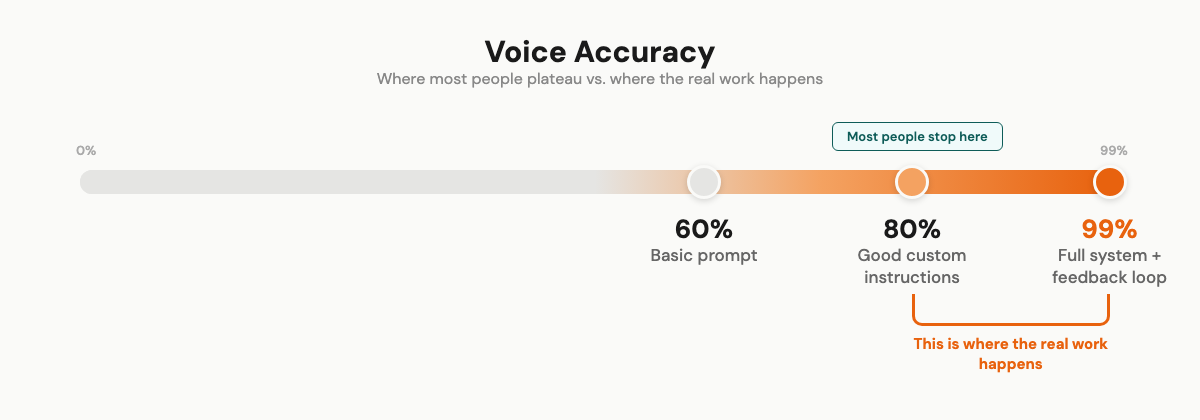
Most people plateau at 80% voice accuracy with AI. Here's the 3-level system I used to reach 99% — starting with something you can do in 30 minutes.
Most people can get AI to write "kind of" like them. 80%, maybe 85% if they're diligent about it. That last 15% is where everyone gets stuck.
I got to 99%.
My team genuinely can't tell which pieces I wrote and which the AI produced. They've guessed wrong multiple times. That didn't happen because I found some magic prompt. It took 18 months of building a system that corrects itself. Every mistake becomes a permanent rule.
I'm going to walk through the full thing. What most people skip, what actually made the difference, and the exact setup I use today. Starting with something you can do in 30 minutes.
## Why everything AI writes sounds the same
You already know this. You've scrolled past it. Read ten AI blog posts about any topic and they blur into one smooth, forgettable thing.
Merriam-Webster made "AI slop" their 2025 Word of the Year. Not because of a marketing campaign. Because people genuinely couldn't take it anymore.
The reason is simple. AI predicts the most probable next word based on its training data. The most probable word is, by definition, the most average one. So when you ask it to write, you get the statistical average of everything it's ever read.
Your personality gets averaged out. By design.
And it's getting worse. AI companies train on internet data. The internet is filling up with AI content. So AI trains on AI output, which produces more AI-like content, which feeds the next generation of models. The average is becoming more average every cycle.
## The tells
Once you learn to spot AI writing, you can't stop seeing it.
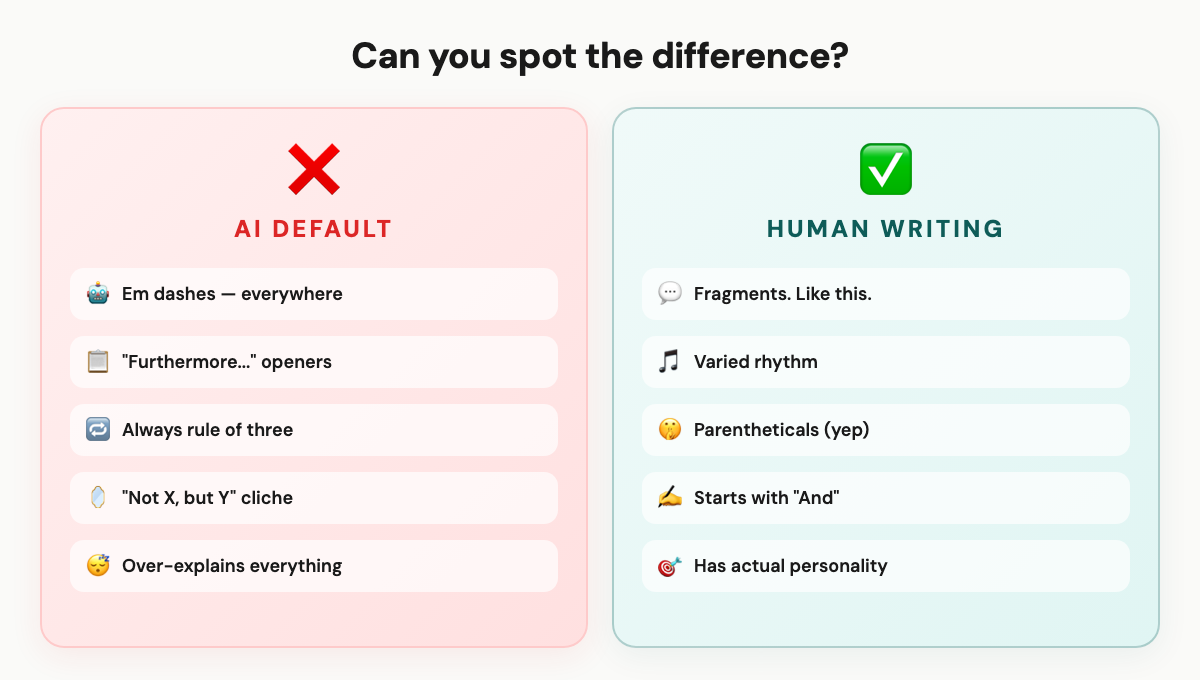
The vocabulary. "Emphasizing," "enhance," "showcasing." Phrases like "In today's ever-evolving landscape." "Delve" was such a giveaway in 2023 that AI companies retrained their models to use it less. (It's still there. They just swapped it for new tells.)
The structure. Em dashes everywhere. I started calling it "the ChatGPT dash." Every sentence the same length. Transitions like "Furthermore" and "Moreover." And the over-explanation, where AI restates what it just said, then explains the restatement.
The patterns. Everything in groups of three. "Not X, but Y" constructions. Sentences that are all grammatically complete, with no fragments, no rough edges. Real humans don't write this cleanly.
Someone on Reddit put it well: "I've straight up noticed the 'that's not X, it's Y' structure being said out loud more often." AI isn't just changing how we write. It's changing how we talk. That's a weird thing to sit with.
## What I tried first (and why it didn't work)
The standard advice: "Just tell AI your tone of voice."
So I did. "Write in a casual, friendly, conversational tone."
Result: the same generic content with slightly shorter sentences. Like putting a baseball cap on a mannequin and calling it casual.
Feeding it examples of my writing was better. But without constraints, the output would drift back to AI defaults within a few paragraphs. Like the model couldn't help itself. It knows what "average" sounds like, and it gravitates there.
Then I tried elaborate prompts. Spent hours engineering the perfect 500-word personality description. Better than nothing. Still not me.
This is what most people get wrong:
Prompts are maybe 10% of the solution. Context is the other 90%.
Context means your actual writing samples. Your vocabulary. Your banned words. Your structural preferences. The things you'd never say. All of it, loaded before you start.
That's the difference between talking to a stranger and talking to someone who's known you for years.
## What actually works
I sat down about a year ago and tried to figure out what makes my writing sound like mine. Not "casual." Not "friendly." What makes a sentence identifiably Wilco versus anybody else?
That turned into a voice profile. Then a system. Then, honestly, an entire operating system that I now use for everything.
Three levels. Start wherever makes sense.
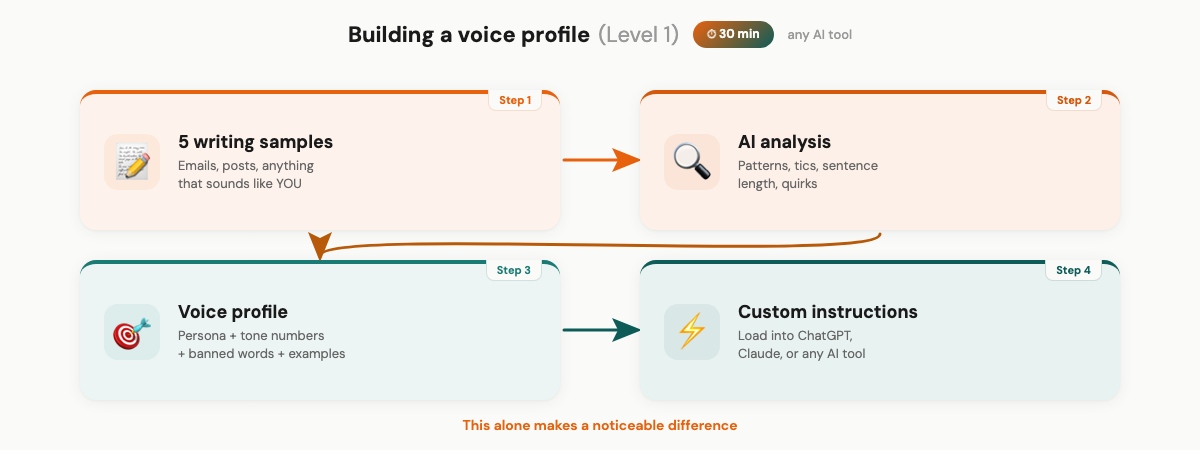
### Level 1: The mirror (30 minutes, any AI tool)
This works with ChatGPT, Claude, Gemini, whatever. Any tool that lets you set custom instructions.
First, collect five pieces of writing that sound the most like you. Not your most polished work. Your most YOU work. Emails you dashed off that got great responses. Social posts that felt natural. The stuff where people said "this sounds like talking to you."
Then ask AI to analyze them:
Analyze these writing samples. Identify: 1. Average sentence length and variation 2. Paragraph length patterns 3. Common phrases or verbal tics 4. How I open pieces (questions? stories? statements?) 5. How I handle transitions between ideas 6. Words I seem to avoid 7. Any quirks or structural patterns
This gives you a mirror. I found patterns I'd never noticed. Turns out I start a lot of paragraphs with "I" and end thoughts with short reactions. I use parentheticals constantly. I'd never have spotted that without looking at my writing as data.
Build a voice profile from the analysis. Mine has four parts:
A persona line. Mine says: "Write like Wilco talking to a smart friend. Not a blog post. Not a textbook." Keep it short. One sentence that captures the vibe.
Tone dimensions as numbers, not adjectives. I rate things like funny/serious (3/5), formal/casual (4/5 toward casual), enthusiastic/matter-of-fact (3/5). Numbers work better because "casual" means something different to everyone. 4/5 is specific.
A banned words list. Every word or phrase you'd never use. Be ruthless and specific.
And two or three example paragraphs. Real samples of your actual writing. Not descriptions of your style. The actual thing.
Load this as custom instructions. It makes a noticeable difference. You'll still edit heavily, but less than before.
### Level 2: The constraint system
Here's where it clicked for me. The single biggest upgrade wasn't telling AI what to do. It was telling it what NOT to do.
AI responds to constraints better than aspirations. "Never use em dashes" is clearer than "write naturally." "Never say game-changing" is clearer than "avoid hype."
These are from my actual system:
WORDS TO NEVER USE: - "Thrilled", "Excited", "Amazing", "Incredible", "Revolutionary" - "Game-changing", "Life-changing", "Breakthrough" - "In today's fast-paced world" - "I hope this email finds you well" - "Delve", "Landscape", "Leverage" (as a verb)
STRUCTURAL RULES: - Never use em dashes (—). Replace with period, comma, colon, or parenthetical. Zero tolerance. - Never group things in threes (rule-of-three is an AI tell) - Max one "not X, it's Y" construction per piece - No sentences longer than 25 words unless telling a story
FORMATTING: - Short paragraphs: 1-3 sentences max - One idea per paragraph - Fragments are fine. Encouraged, even.
I'm not worried about sharing these. They're specific to me. Yours will be different because your writing is different. But the principle works for everyone: define what you're NOT before defining what you are.
Now here's the piece most voice-profile guides miss entirely.
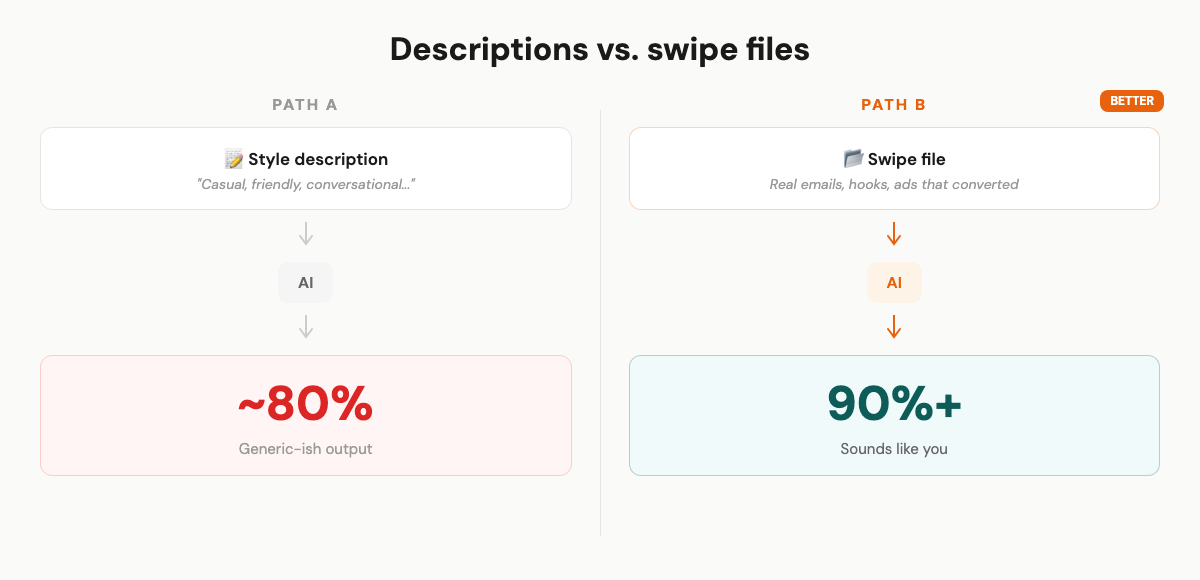
Descriptions of your style are vague. "Casual and conversational" could mean a thousand things. But actual examples of your writing? Those are precise.
I stopped giving AI vague style descriptions and started giving it my actual best-performing content. Real emails that got replies. Hooks that stopped the scroll. Ad copy that converted. Landing page sections that kept people reading.
When AI needs to write something new, it pulls from real reference material. Not a description of what I sound like. The actual thing.
Think of it like this. If you hired a ghostwriter, would you hand them a paragraph about your voice? Or would you give them a folder of your 20 best emails and say "write like this"?
The folder wins every time.
### Level 3: The operating system (Claude Code)
This is what I actually use daily. If Level 2 is a voice profile, Level 3 is a voice architecture.
I use Claude Code, which is Anthropic's CLI tool for Claude. It's different from the regular chat interface because it works with files on your computer. Reads them, edits them, runs code. That matters for what I'm about to describe.
The core idea: Claude Code reads a file called CLAUDE.md at the start of every session. Automatically. No manual loading. I have these files at multiple levels (a root file with business context, a project file with marketing rules). They cascade, so every conversation starts with full context before I type a single word.
Here's my actual file structure:
MarketingOS/ ├── CLAUDE.md <- loads every session, automatically ├── core/ │ ├── tone-of-voice.md <- full voice profile (193 lines) │ ├── wilco-background.md <- credentials, stories, personality │ └── my-swipes/ │ ├── wilco-emails.md <- actual sent emails │ ├── hooks.md <- hooks that performed well │ └── ads.md <- ad copy that converted ├── lessons.md <- self-correcting rules file ├── stories/ <- personal stories, indexed and tagged └── .claude/skills/ <- workflow templates per content type
A few things to notice.
The my-swipes/ folder. This is where the real reference material lives. Not descriptions of my voice. Actual emails I sent. Actual hooks I wrote. Actual ad copy that ran. When the system needs to write a new newsletter, it loads my sent emails as reference. When it writes a hook, it pulls from hooks that actually performed. The swipe files are what keep the output grounded in reality instead of drifting toward AI average.
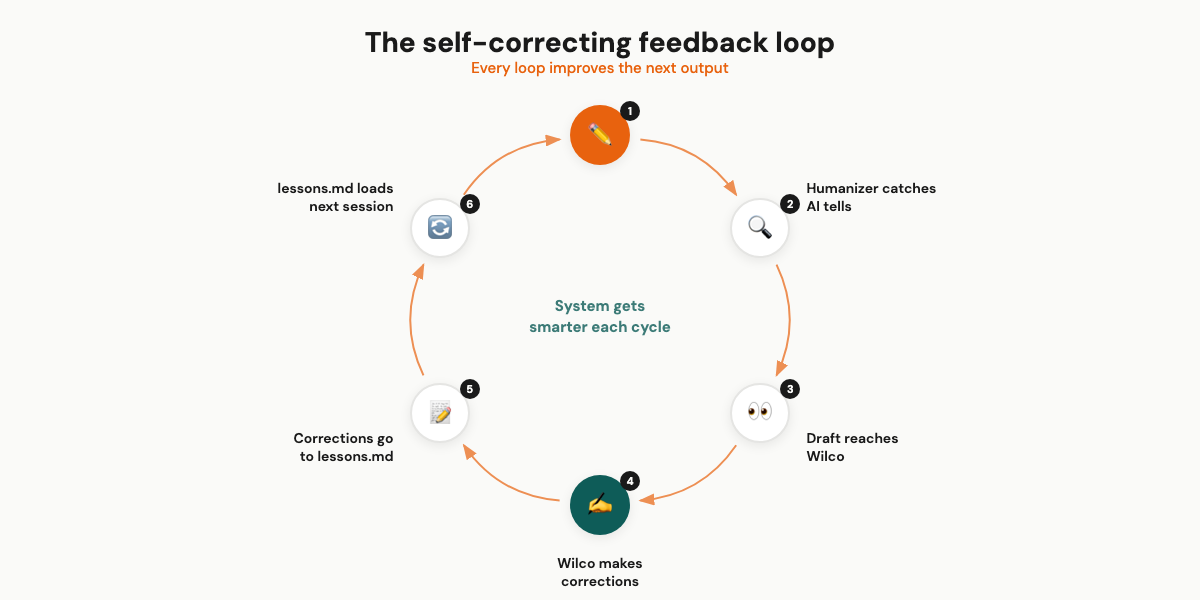
The part that makes everything compound is a single file: lessons.md.
It captures corrections in real time. When AI writes something that doesn't sound like me, the correction becomes a permanent rule.
Early on, the system kept producing sentences like "This tool is a game-changer for marketers who want to leverage AI." Three problems in one sentence. "Game-changer." "Leverage" as a verb. Generic structure.
I corrected it. "Never use game-changer. Never use leverage as a verb. Write specific, not vague."
That went into lessons.md. It loads every session. The system never makes that specific mistake again.
After a few weeks, lessons.md had dozens of rules. After a few months, the system had accumulated so many corrections that first drafts barely needed editing.
This is what separates a static voice profile from a living system. The profile doesn't learn. The system does.
I use the same core voice across newsletters, tweets, Facebook ads, landing pages, LinkedIn posts, customer emails. The tone-of-voice doc is the foundation. Each content type has its own workflow that adapts the voice for that format. A tweet doesn't need the same structure as a landing page. But the vocabulary, the personality, the banned words? Those stay consistent everywhere.
One more thing. The final quality gate. Before any draft reaches me, it runs through a tool called the humanizer. It's an open-source Claude Code skill (7,500+ GitHub stars) based on Wikipedia's "Signs of AI writing" guide. It checks for 24 specific AI patterns: rule-of-three groupings, "not X, but Y" structures, banned vocabulary, em dashes, uniform sentence rhythm, topic sentences that telegraph the paragraph.
You can install it yourself:
git clone https://github.com/blader/humanizer.git ~/.claude/skills/humanizer
Then invoke it with /humanizer inside Claude Code. It catches things I'd miss on a quick read. Especially structural patterns that feel "off" but are hard to pinpoint manually.
All of these layers stack. By the time a draft reaches me, it's already 95%+ there. My editing is tweaking, not rewriting.
## The compounding effect
Most voice profile advice says: build it once, load it, done.
That's a band-aid. Helps immediately. Never gets better.
My system is different because every correction compounds. Here's what that actually looked like:
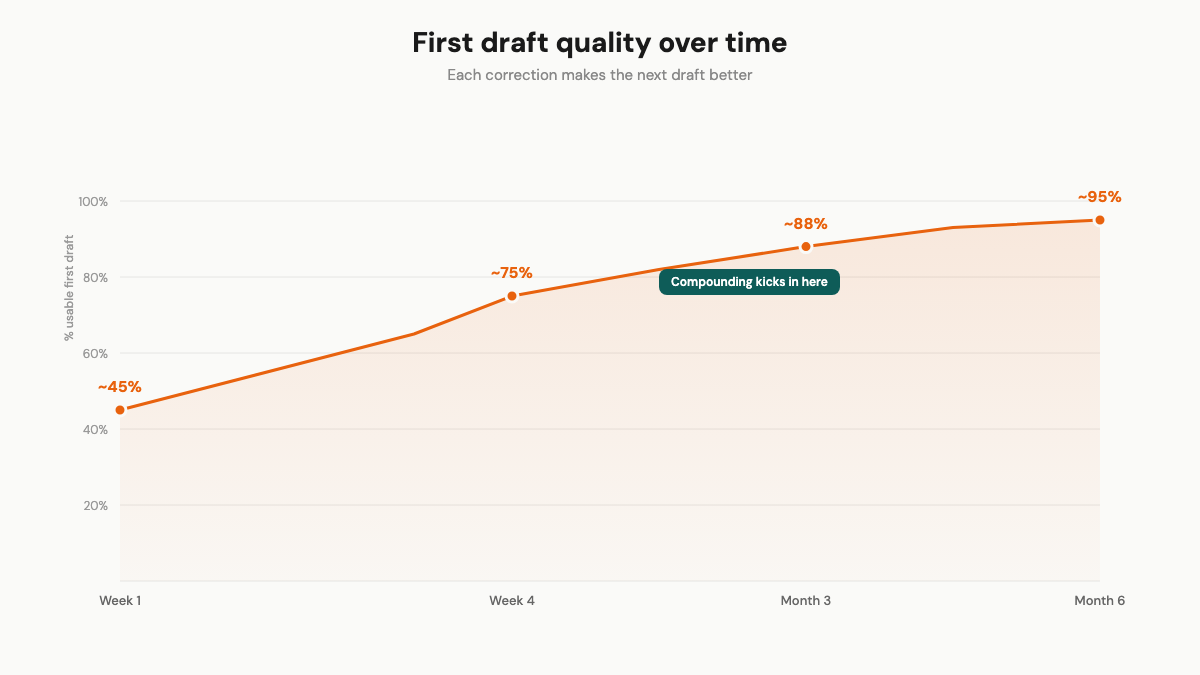
The first week, maybe 40-50% of the output sounded right. Heavy editing. I was adding corrections to lessons.md multiple times per session. Basic stuff. Wrong vocabulary. Too-formal openings. Over-explanation.
By week four, first drafts were 70-80% usable. The obvious tells were gone. I was catching subtler things. Sentence rhythm. The way I use parentheticals. How I transition between ideas (hint: I usually don't, I just start the next thought).
After about three months, it flipped. Light editing, not rewrites. The system had enough rules and reference material that it anticipated my preferences. Occasionally something slips through. I add a new lesson. It doesn't slip again.
The people who say voice profiles don't work are right, if they build one and never update it. That's like going to the gym once and saying exercise doesn't work.
The compounding is the point.
## Honest trade-offs
It doesn't work on day one. Your first outputs with a fresh voice profile will still need heavy editing. The system needs your corrections to learn. That's the whole point.
I noticed short formats get good fast. Quick emails and social posts reached "near-perfect" for me long before articles or landing pages did. Makes sense. Less room for the voice to drift when you're writing 200 words versus 2,000.
And I still review everything. Every piece, before it goes out. The difference is I'm tweaking sentences instead of rewriting from scratch. That's a massive time save, but it's not autopilot.
One more thing to be upfront about: Level 3 requires Claude Code, which is a developer-oriented tool. If you're not comfortable with a terminal, Levels 1 and 2 will still get you to 85-90%. That's dramatically better than what most people are working with. Level 2 takes a few hours. Level 3 took me weeks. Most people won't go there, and that's fine.
## Start with Level 1
Collect five pieces of your writing. Analyze them. Build a basic voice profile. Load it as custom instructions. 30 minutes.
That alone will noticeably improve everything AI writes for you. And if you want to go further, the levels are there.
Talk soon,
Wilco
Practical AI marketing automations delivered to your inbox. No spam, no fluff — just ideas you can use.